Internal and external storage are two components that are always present in computers. Although they are frequently relied upon, many people are still unaware that these two types of storage—or memory—are different.
What are the differences between internal and external memory? Which type of storage is ideal to use? Read the full explanation in this article to find the answers to these two questions.
What Is Internal Storage?
Internal storage is a form of memory that is built directly into the processor. It is located inside the device and cannot be seen directly. This type of memory must be present in every device—such as smartphones, computers, and laptops—for the system to function.
Internal memory serves to “remember” the history of programs or data used while the device is operating. Additionally, internal memory is also used to store the Operating System (OS) on the device, acting as temporary memory when running applications or software.
What Is External Storage?
External storage is a form of memory in the form of hardware. Data in external memory can be stored permanently so it is not lost when the computer is turned off.
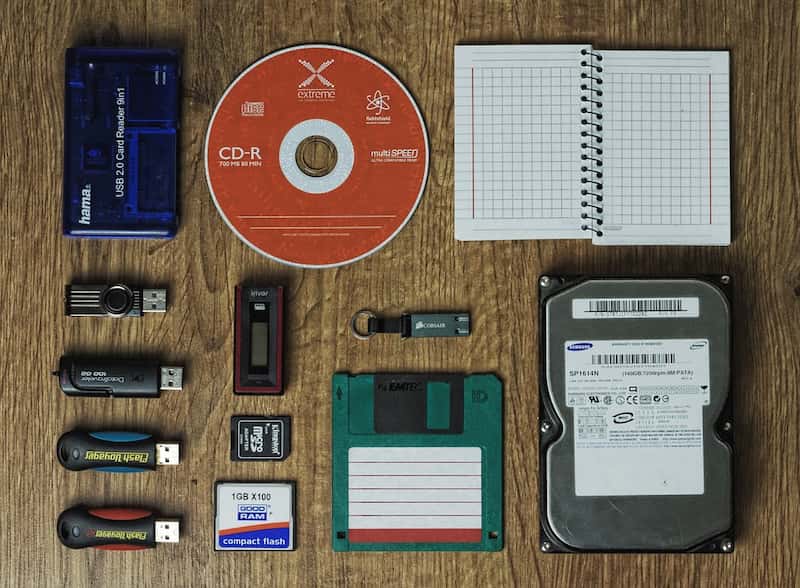
External storage hardware comes in a wide variety, ranging from flash drives, CDs, DVDs, and memory cards to the latest option: cloud computing. Some of these devices support read-write operations, while others can only perform a single write operation.
What Is the Difference Between Internal and External Memory?
Essentially, the difference between internal and external memory lies in their form. However, there are other distinguishing factors between these two types of memory, namely:
1. Location of the Memory
Internal memory is located inside the device and is built-in, so it cannot be removed. Meanwhile, external memory is located outside the device and can be removed from it (removable).
2. Ease of Data Transfer
You’ll face difficulties when transferring data from internal memory. Why? Internal storage is configured with security measures that make data operations—such as transferring and deleting data—more difficult. These security measures aren’t present in external memory, so data is easier to transfer and modify.
3. Risk of Loss
The final difference lies in the risk of data loss. Data in internal memory is more prone to loss because the system can delete it at any time. Meanwhile, data on external storage is not tied to the device’s system, so it is less likely to be lost or damaged.
{{blogcard id=”182″}}
What Are the Types of Internal Storage?
Internal storage can be considered a device’s primary memory. One type, RAM, is an essential storage feature found in all computers and laptops. However, there are other types of internal storage that are just as useful. What are they?
1. Random Access Memory (RAM)
Why is RAM referred to as the primary storage medium? The reason is that RAM stores data, activities, and software currently running on the device. For example, imagine you’re designing an image in illustration software. The data you’re currently working on is temporarily stored in RAM.
In fact, you can’t perform any activities on a computer without RAM—from editing documents and browsing the web to using software and even playing games. The larger the RAM capacity, the faster and smoother the computer runs. However, RAM does not draw power from the device, so the data stored in it can easily be lost.
2. Read-Only Memory (ROM)
Smartphone users often refer to ROM as internal storage. On a computer, ROM takes the form of a semiconductor memory chip, and its contents can be read by the computer system. Unlike RAM, data in ROM is permanent even when the device is not powered.
ROM functions similarly to RAM—it optimizes system performance to enhance the user experience. However, ROM is specifically used to store the operating system (OS) and the device’s firmware.
3. Solid State Drive (SSD)
SSDs are built using integrated circuit (IC) arrays to store data or files. This type of storage emerged in the 1990s and offers higher speeds than the other two types of internal memory. Due to these advantages, SSDs are often used as an alternative to ROM when running a system alongside RAM.
SSDs are also available as external storage devices, much like Hard Disk Drives (HDDs). External SSDs are usually designed to be smaller, making them convenient to carry anywhere.
What Are the Types of External Storage?
The types of external storage haven’t always remained the same over time. In the past, floppy disks were a popular form of external storage, but they’ve largely fallen out of use today. Let’s take a closer look at the different types of external storage for computers.
1. USB Flash Drive
USB flash drives are small in size but come in a wide range of capacities, from 512 MB and 2 GB up to the latest models at 1 TB (1,000 GB). Therefore, it’s no surprise that USB flash drives were a favorite storage medium through the 2010s. However, they are quite vulnerable to viruses, which can render the data unreadable and cause permanent loss.
2. Hard Disk Drive (HDD)
There are two types of HDDs: internal HDDs and external HDDs. Internal HDDs are installed inside the computer like ROM, while external HDDs can be taken anywhere, just like a flash drive. HDDs have larger capacities, such as 512 GB, 1 TB, 2 TB, and so on. It is this capacity that makes HDDs commonly used for storing and backing up large amounts of data.
3. Compact Disc (CD)
CDs are shaped like optical discs and come in several types: CD-ROM, CD-WORM, and CD-RW. CD-ROMs and CD-WORMs can only be used to burn data once, unlike CD-RWs, which can be rewritten multiple times. CDs are falling out of favor because they are quite complicated to use. Additionally, not all laptops are equipped with a CD drive.
4. DVD
Both are disc-shaped, but what distinguishes CDs from DVDs? DVDs are essentially an evolution of CDs, offering greater storage capacity and the ability to play high-quality video. It’s no wonder DVDs are often used to store movies or recorded videos.
5. SD Cards
This type of external storage isn’t limited to smartphones and cameras. Some computers and laptops also come with adapters so SD cards can be inserted into them. There are three types of SD cards: SD Card, Mini SD (for cameras), and Micro SD (for smartphones).
6. Floppy Disks
Floppy disks are square-shaped, thinner, and flexible, and are stored in acrylic cases. This type of external storage was most widely used in the past but is now falling out of use. Why? The storage capacity of a floppy disk is very small—just 1.44 MB. Floppy disks are also no longer practical to use today, given that modern computers no longer come equipped with floppy drives.
7. Magnetic Tape
This storage medium is made of magnetic material and coated on thin plastic. Magnetic tape is usually found inside cassette tapes, so it must be read using a tape drive. Its storage capacity can reach 1.2 TB, but magnetic tape is prone to damage, so it is not commonly used.
8. Cloud Storage
Cloud storage is gaining popularity today due to its many advantages. This medium is available in a virtual form, so it requires an internet connection to access it. Data on your computer is automatically saved to cloud storage. There are also cloud storage providers that offer restore features, so you don’t have to worry about losing important data due to accidental deletion.
Many companies are now actively subscribing to cloud storage. You shouldn’t fall behind in technological advancements—use the best cloud storage solution available: FileBox Cloudmatika. FileBox is equipped with a file restore feature that can recover files deleted intentionally or accidentally, and even files damaged by ransomware.
Want to learn more about this feature? Contact Cloudmatika right now and experience the ease of data management for your company.
Have you learned about the two types of memory after reading this article? In short, external storage and internal storage are two types of memory that are equally beneficial for computer users.